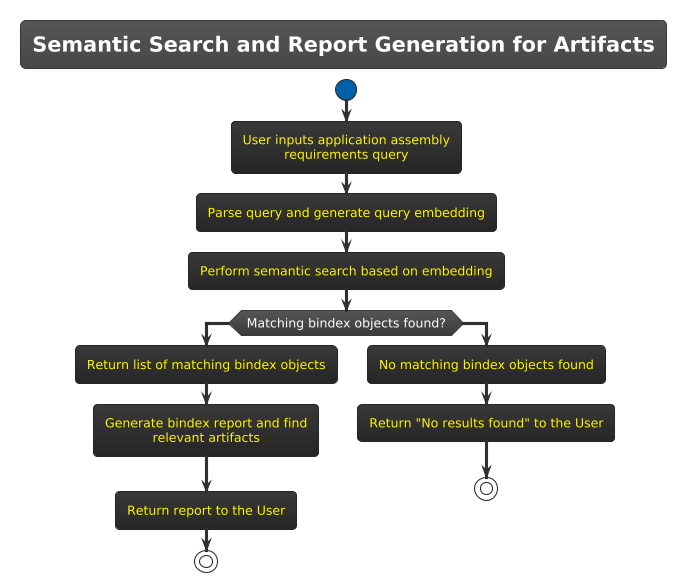
AI Assembly
Machai leverages the power of GenAI to revolutionize how customer projects are assembled from libraries available on the Machanism platform. The key idea is to enable automatic assembly by utilizing structured metadata and semantic insights. To realize this concept, the bindex.json file is proposed as a central descriptor for all libraries in the Machanism ecosystem.
The bindex.json file serves as a structured repository of library information tailored for GenAI-powered automatic assembly and configuration generation. It contains detailed metadata, including example usage and integration points, making libraries more accessible and usable. One of the file's key attributes, the description parameter, is used for semantic search. This allows GenAI to intelligently collect and propose libraries potentially relevant to customer applications based on their high-level intent. By integrating this approach, Machai ensures streamlined project assembly using advanced AI-driven insights.
The Brick Index
The name "bindex" is derived from "Brick Index" inspired by the LEGO allegory used to represent our libraries. Just as LEGO bricks fit together to build complex structures, Machanism libraries are modular components that can be assembled seamlessly to create customized applications.
The bindex.json is a descriptor file that encapsulates library and content information, enabling the automated assembly of customer applications. This process leverages GenAI to analyze project information, generate embeddings, and store the descriptor file in a vector database for efficient semantic search functionality in response to user queries.
BINDEX Generation and Registration
Below is a breakdown of the workflow:
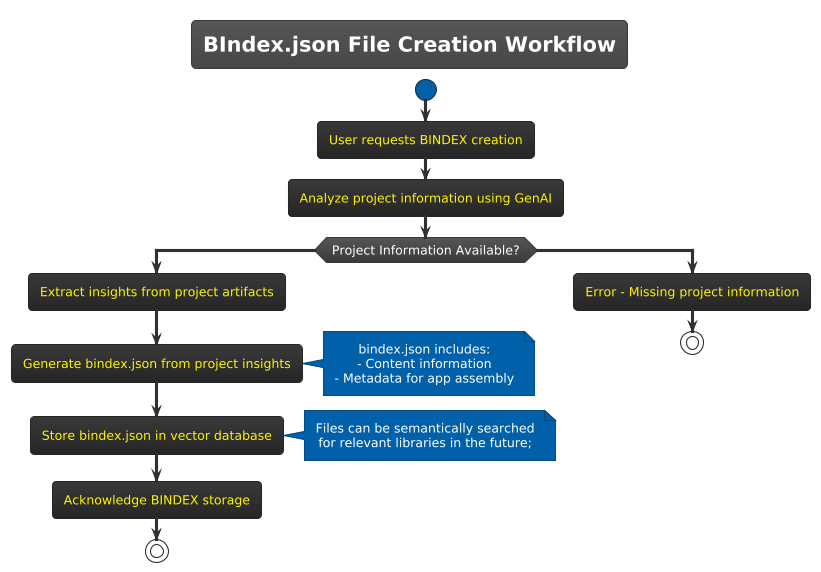
1. Bindex Creation Request
The process begins with the user initiating a request to create and register a Bindex file.
2. Analysis of Project Information
GenAI analyzes various project artifacts to extract relevant information. These include:
- pom.xml: The configuration file of Java-based projects using Apache Maven.
- Source Code Files: Analyzed to extract API usage, coding patterns, and other relevant information.
- Other Metadata: Description, author information, and the high-level purpose of the project.
GenAI uses its advanced natural language understanding and pattern recognition capabilities to process both structured and unstructured content of the project files.
3. Generating bindex.json
Based on the analysis, GenAI generates the bindex.json file. This file serves as the descriptor of the library and application-specific content. It typically contains:
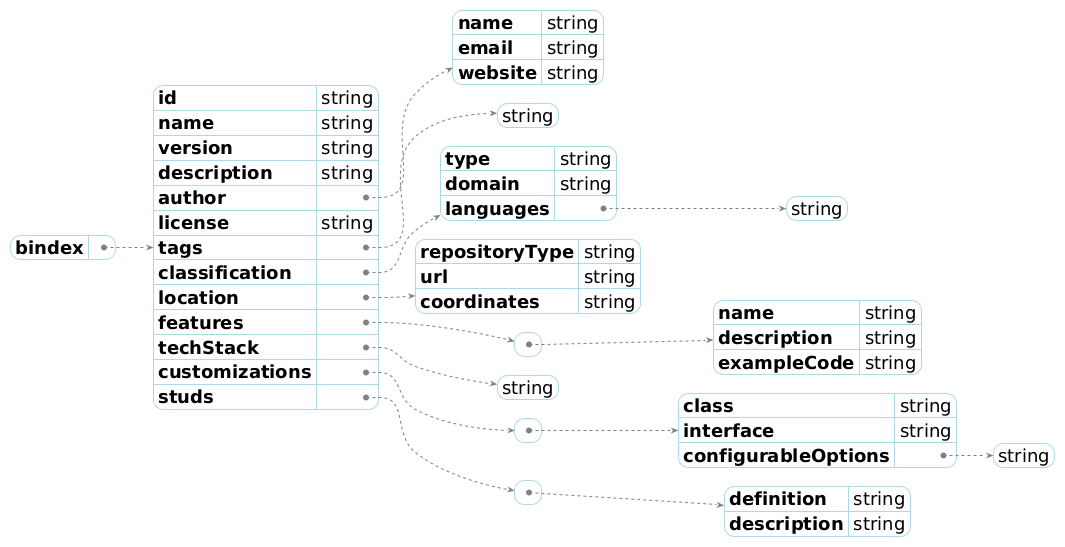
The bindex.json file contains the following information:
Overview of Information Contained in bindex.json
The bindex.json file provides essential metadata for describing an artifact. It contains the following key pieces of information:
- Basic Artifact Metadata
- Authorship and Legal Information
- Categorization and Search Tags
- Artifact Storage and Repository Information
- Technical Details
- Extension and Integration Points
In summary, the bindex.json file acts as a well-structured descriptor for artifacts. It contains metadata, technical details, and integration points to enable automated application assembly and improve searchability through semantic embeddings.
This compact list outlines the high-level structure and content of the bindex.json file.
The bindex.json file is created programmatically to ensure it complies with a predefined schema for consistency.
4. Storing bindex.json in a Vector Database
Once created, the bindex.json file is stored in a vector database. Vector databases are specifically designed for operations such as storing and retrieving embeddings, thus allowing efficient semantic search and ranking.
- The contents of the
bindex.jsonfile are indexed using semantic embeddings, ensuring that the file can be retrieved based on meaning, not just exact keywords. - The search and indexing process ensures that developers can quickly find relevant libraries and files based on high-level queries.
BINDEX Schema
Schema location: https://machanism.org/machai/schema/bindex-schema-v1.json or bindex-schema-v1.json
| Property Name | Type | Description |
|---|---|---|
| id | string | A unique identifier for the artifact (e.g.: [groupId]:[artifactId]:[version]). |
| name | string | The full name of the artifact, commonly formatted as groupId:artifactId for Maven artifacts. |
| version | string | The version of the artifact, typically using semantic versioning, tags, or hashes. |
| description | string | A critical property used to generate embeddings for semantic search in application assembly. This description must provide all relevant contextual and project-specific information, automatically generated from the project description and additional content as needed. |
| author | object | Information about the author or organization responsible for the artifact, including name, email, and website. |
| license | string | The license type that governs the artifact (e.g.: MIT, Apache 2.0, etc.). |
| tags | array | A list of keywords or tags describing the artifact to enhance discoverability. |
| classification | object | Categorization details about the artifact, including type (library, plugin), domain, and supported programming languages. |
| location | object | Information about where the artifact is stored, including repository type, URL, and coordinates within the repository. |
| features | array | A list of the main capabilities or features provided by the artifact, including their details and code examples. |
| techStack | array | A collection of technologies, frameworks, tools, and runtimes that are used by the artifact (e.g.: Docker, Kubernetes, Java). |
| customizations | array | Developer extension points provided by the artifact, including classes, interfaces, and configurable options. |
| studs | array | Definitions of interfaces or abstract classes that are designed to be extended or implemented by other modules. |
Assembly
Semantic Search
When the user queries the system, the vector database utilizes its semantic indexes to identify the most relevant results — finding libraries or related components based on "intent" rather than exact matches. The user is notified of the availability of the requested files or relevant results.