The Bindex

The name "bindex" is short for "Brick Index," inspired by the concept of LEGO bricks seamlessly fitting together to create complex structures. Similarly, the libraries within the Machanism platform are modular components designed to be assembled into customized applications with ease.
The bindex.json file is a structured descriptor designed to provide comprehensive information about libraries within the Machanism platform. It serves as the foundation for automated application assembly by addressing three critical questions developers need to answer when integrating libraries:
-
What is this library? The
bindex.jsonfile provides a detailed description of the library, including:- Name: The full name of the library, typically formatted as
groupId:artifactId. - Version: The version of the library, usually following semantic versioning standards.
- Description: A project description.
- Features: A list of the library’s main capabilities, accompanied by code examples to illustrate how they can be utilized.
- Classification: Details about the library’s type (such as library or plugin), its application domain, and the programming languages it supports. This information is utilized to semantic search and provide more accurate library recommendations.
- Name: The full name of the library, typically formatted as
-
Where is it located? The
bindex.jsonfile specifies the location of the library, ensuring developers can easily access and retrieve it. This includes:- Repository Information: The type of repository (e.g., Maven, npm, PyPI) and its URL.
- Coordinates: Precise details about the library's location within the repository, such as group ID, artifact ID, and version.
- License: The license type governing the library (e.g., MIT, Apache 2.0), ensuring developers understand the terms of use.
-
How can it be used? The
bindex.jsonfile provides practical guidance on how to integrate and use the library effectively:- Constructors: Information on how the library's objects or services can be instantiated and configured, including package names, method signatures, and example code snippets.
- Customizations: Extension points for developers, such as configurable options, classes, or interfaces that can be leveraged to adapt the library to specific needs.
- Studs: Definitions of interfaces or abstract classes designed to be extended or implemented by other modules.
- Features and Integration Points: Detailed descriptions of the library’s capabilities and how they interact with other components in the application.
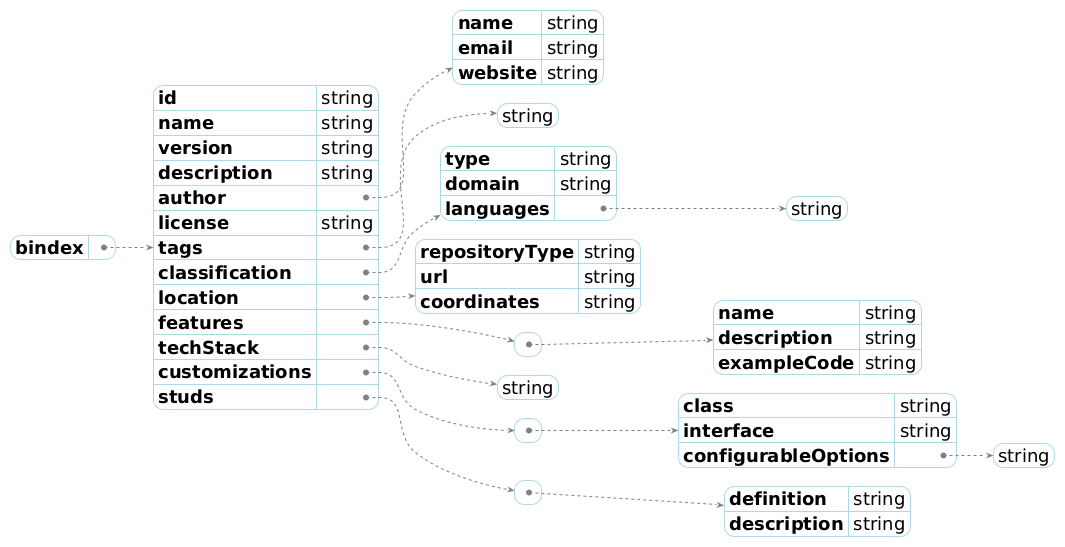
Schema Overview
The bindex.json file adheres to a predefined schema, ensuring consistency and standardization across all libraries. The schema includes the following key properties:
| Property Name | Description |
|---|---|
| id | A unique identifier for the artifact (e.g., groupId:artifactId:version). |
| name | The full name of the artifact, typically formatted as groupId:artifactId for Maven artifacts. |
| version | The version of the artifact, usually following semantic versioning. |
| description | A project description. |
| authors | Information about the author(s) or organization responsible for the artifact, including name, email, and website. |
| license | The type of license governing the artifact (e.g., MIT, Apache 2.0). |
| classification | Categorization details, such as type (library, plugin), domain, and supported programming languages. A critical property used for semantic search. |
| location | Repository information, including type, URL, and coordinates. |
| features | A list of the artifact's main capabilities, with details and code examples. |
| constructors | Information on how the artifact's objects or services are instantiated and configured. |
| customizations | Extension points for developers, such as configurable options, classes, or interfaces. |
| studs | Definitions of interfaces or abstract classes designed for extension or implementation by other modules. |
| examples | Additional usage examples. |
The full schema is available at bindex-schema-v2.json.
Generation
The bindex.json file is automatically generated by GenAI based on the analysis of the project’s metadata and source files. This automation significantly streamlines the process of creating a well-structured descriptor for libraries. However, while GenAI provides a powerful foundation for generating the file, it is essential for developers to carefully review and verify the output to ensure accuracy, completeness, and alignment with the library’s intended purpose. This step ensures that the bindex.json file meets the required standards and is ready for registration and use.
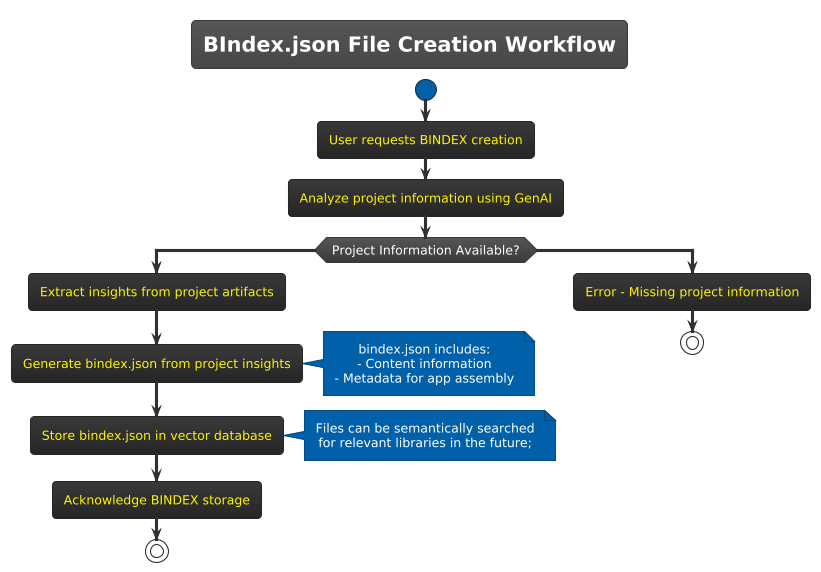
The creation of a bindex.json file involves the following steps:
-
Bindex Creation Request:
A user initiates a request to create and register abindex.jsonfile for a specific library or project. -
Project Analysis:
GenAI analyzes the project’s build files, source code, and other metadata to extract relevant information. This includes:- Project build files (e.g.,
pom.xml,package.json,pyproject.toml) - Source code for API usage and coding patterns
- Metadata such as descriptions, author details, and project purpose
- Project build files (e.g.,
-
File Generation:
Based on the analysis, GenAI generates a comprehensivebindex.jsonfile containing all necessary metadata, technical details, and integration points. -
Review and Update:
After thebindex.jsonfile is generated, it is essential for the user to review its content to ensure accuracy and completeness. This includes:- Verifying that the description accurately reflects the library's purpose and functionality.
- Confirming the correctness of metadata fields such as version, authorship, license, and classification.
- Checking the integration points, features, and customizations for accuracy and completeness.
- Updating or refining any details that may not have been captured correctly by the automated generation process.
This review step is critical to ensure the quality and reliability of the
bindex.jsonfile before registration. Any inaccuracies or missing information should be corrected to ensure the file meets the required standards.
Once the bindex.json file has been reviewed and updated (if necessary), it is ready to be registered. The file is stored in the vector database, where it can be indexed and made available for semantic search and retrieval.
Register
The BIndex Register process is a critical step in the Machanism platform's AI Assembly framework. It involves processing, and storing the bindex.json file, which acts as the foundation for automated library discovery, selection, and integration. This process ensures that libraries are properly indexed and can be efficiently retrieved through semantic search based on user requirements. Below is a detailed breakdown of the BIndex register process:

-
User Request for BIndex Register
- The process begins when a developer or system user submits a request to register a
bindex.jsonfile for a specific library or project. - This request initiates the register process and triggers the analysis of the associated project information.
- The process begins when a developer or system user submits a request to register a
-
Open BIndex
- The system scans the project structure and detects the
bindex.jsonfile. - This step ensures that the necessary metadata file is accessible for processing.
- The system scans the project structure and detects the
-
Generate the Description Embedding
- The
descriptionfield from thebindex.jsonfile is processed to create a semantic embedding. - This embedding captures the library's purpose, features, and context, enabling efficient semantic search and matching with user queries.
- The
-
Collect and Normalize Used Programming Languages
- The system extracts information about the programming languages used in the library from the
bindex.jsonfile. - The data is normalized and stored in a dedicated field for further use in library classification and recommendation.
- The system extracts information about the programming languages used in the library from the
-
Generate Domains Embedding
- The library's domain (e.g., machine learning, web development, data processing) is analyzed, and a semantic embedding is generated.
- This embedding allows the system to associate libraries with specific application domains and recommend them accordingly.
-
Save Data to Database
- All extracted and generated information—including the
bindex.jsonfile, description embedding, programming language data, and domain embedding—is stored in a vector database. - The database is optimized for semantic search, enabling developers to retrieve libraries based on intent or natural language queries.
- All extracted and generated information—including the
-
Acknowledge BIndex Storage
- Once the
bindex.jsonfile and its associated data are successfully stored in the database, the system sends an acknowledgment to the developer. - This confirmation ensures that the library is registered and available for future discovery and integration.
- Once the